Using OpenRouter With LangChain: ChatOpenRouter Setup Guide
OpenRouter ·

You want to add OpenRouter’s 400+ models to your existing LangChain app without rebuilding anything. The integration now has a dedicated package: langchain-openrouter on PyPI and @langchain/openrouter on npm, but many older guides still teach the ChatOpenAI plus base_url override. This guide covers the current path.
When you point a LangChain chain at ChatOpenRouter, our routing layer handles provider load balancing, outage avoidance, and cross-provider failover automatically. Your chain code never sees the retry, and an incomplete request doesn’t cost you anything. LangChain’s docs cover the parameters; this guide also covers the routing behavior behind them.
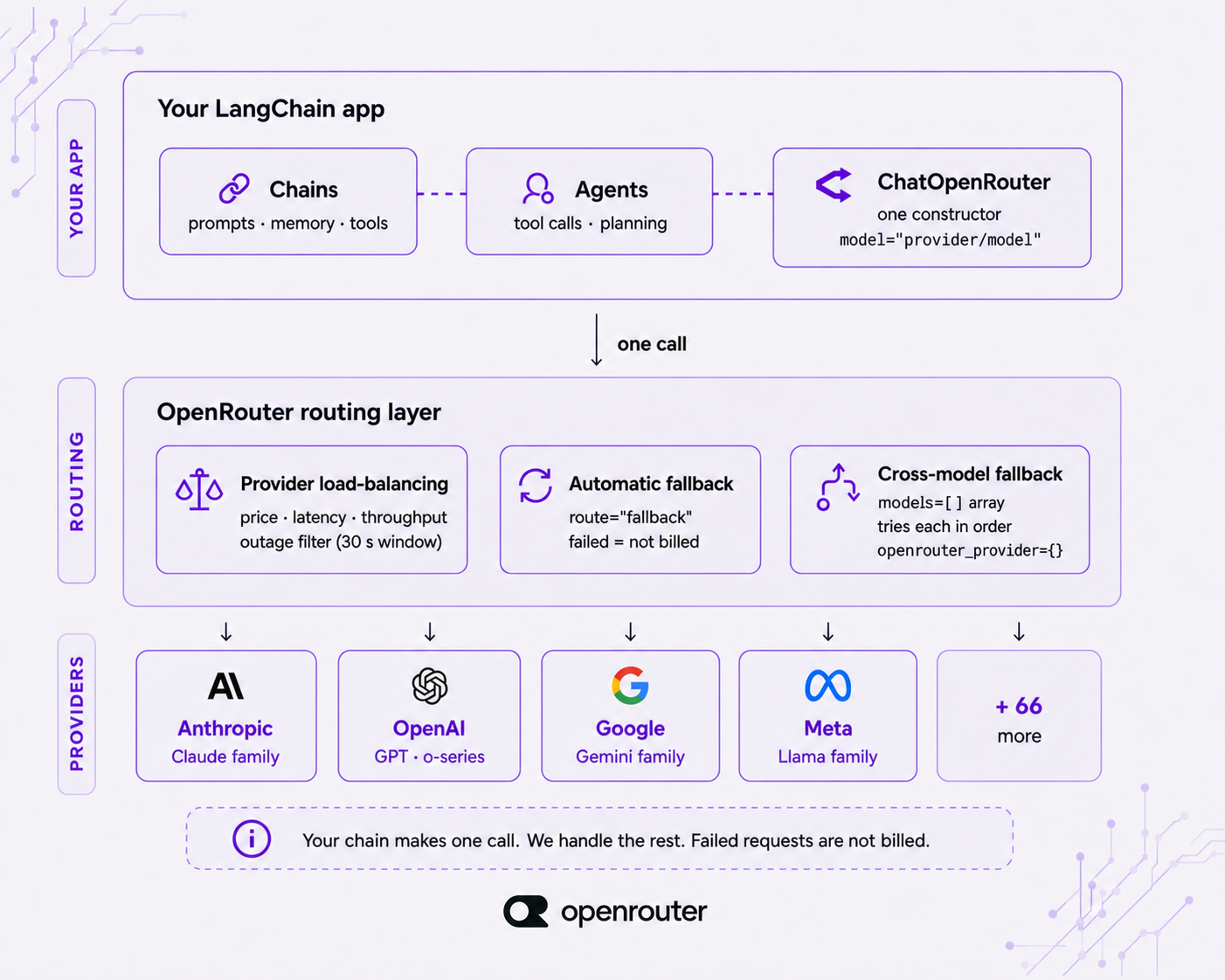
Quickstart: OpenRouter in a LangChain app in 5 minutes
Get a working model call in three steps: install, authenticate, invoke.
OpenRouter is a model router behind one OpenAI-compatible API: one endpoint, 400+ models, 70+ providers. ChatOpenRouter slots into any chain or agent like any other LangChain chat model. The model string is the only OpenRouter-specific piece.
Step 1: Install and authenticate
Install langchain-openrouter and put your key in the environment. Generate a key at openrouter.ai/settings/keys.
pip install -U langchain-openrouter
export OPENROUTER_API_KEY="sk-or-..."
Use the -U flag. The package is beta and moves fast; always pull the latest. ChatOpenRouter automatically reads OPENROUTER_API_KEY from the environment. You can also pass it explicitly as api_key if you manage secrets differently.
Step 2: Instantiate and invoke
from langchain_openrouter import ChatOpenRouter

model = ChatOpenRouter(
    model="anthropic/claude-sonnet-4.5",
    temperature=0,
    max_tokens=1024,
    max_retries=2,
)

response = model.invoke("Summarize this support ticket in one sentence.")
print(response.content)temperature, max_tokens, and max_retries behave exactly as they do on any LangChain chat model. The model argument is our slug in provider/model format.
If you want to confirm your key works before wiring up LangChain, the endpoint speaks the OpenAI Chat format directly:
curl https://openrouter.ai/api/v1/chat/completions \
  -H "Authorization: Bearer $OPENROUTER_API_KEY" \
  -H "Content-Type: application/json" \
  -d '{
    "model": "anthropic/claude-sonnet-4.5",
    "messages": [{"role": "user", "content": "Summarize this support ticket in one sentence."}]
  }'
Same key, same model string, same response shape. ChatOpenRouter is a typed LangChain wrapper over that endpoint.
Step 3: TypeScript
The TypeScript path is the same shape with @langchain/openrouter:
import { ChatOpenRouter } from '@langchain/openrouter';

const model = new ChatOpenRouter('anthropic/claude-sonnet-4.5', {
  temperature: 0.8,
});

const response = await model.invoke('Summarize this support ticket in one sentence.');
console.log(response.content);
Install with npm install @langchain/openrouter. The current version lives on npm.
Full setup details are on OpenRouter’s LangChain integration page and in LangChain’s ChatOpenRouter reference.
Pick a model: the provider/model string
The model parameter is OpenRouter’s slug in provider/model form, and swapping models is a one-string change. Nothing else in your chain moves: your prompts, tool definitions, and output stay as they are.
Set model="anthropic/claude-sonnet-4.5" today, change it to openai/gpt-5-mini or deepseek/deepseek-r1 tomorrow, and your chains stay exactly as they are.
Pull current provider/model strings from openrouter.ai/models. That page shows which models are available, which providers offer them, and how much each one costs per token. The slugs in this guide are illustrations; the catalog is the source of truth.
For LangChain agents, there’s a shorthand that skips the constructor entirely:
from langchain.agents import create_agent

agent = create_agent(model="openrouter:anthropic/claude-sonnet-4.5")
The openrouter:provider/model prefix tells create_agent to resolve through ChatOpenRouter. Same one-string swap, one layer up.
Streaming responses
Use stream_events to get tokens as the model produces them. The async variant, astream_events, does the same within an async chain.
Streaming costs the same per-token rate as a non-streaming call. You stream for the user experience, not the bill.
for event in model.stream_events(
    "Explain provider routing in three sentences.",
    version="v3"
):
    if event["event"] == "on_chat_model_stream":
        print(event["data"]["chunk"].text, end="", flush=True)
Pass version="v3" to get the current event schema. The async form is the same with astream_events and an async for:
async for event in model.astream_events(
    "Explain provider routing in three sentences.",
    version="v3"
):
    if event["event"] == "on_chat_model_stream":
        print(event["data"]["chunk"].text, end="", flush=True)
usage_metadata is available on the final aggregated message, so you can read token counts without making a second call.
Tool calling and structured output
Use bind_tools for tool calling and with_structured_output for typed responses. Both accept strict=True to force schema adherence. strict works with the function_calling and json_schema methods, not with json_mode.
Bind tools with a Pydantic schema
from pydantic import BaseModel, Field

class GetWeather(BaseModel):
    """Get the current weather for a city."""
    city: str = Field(description="City name, e.g. 'Lisbon'")

model_with_tools = model.bind_tools([GetWeather], strict=True)
result = model_with_tools.invoke("What's the weather in Lisbon?")
print(result.tool_calls)
strict=True makes the model adhere to the tool schema rather than improvising arguments.
Get structured output
with_structured_output binds a schema to the whole response:
class TicketSummary(BaseModel):
    sentiment: str
    priority: int
    summary: str

structured = model.with_structured_output(TicketSummary, method="json_schema")
summary = structured.invoke("Customer is furious the export button is broken again.")
print(summary.priority, summary.summary)
The default method is function_calling. Passing method="json_schema" uses native JSON-schema enforcement where the model supports it.
Not every model supports every method; check the model catalog for per-model capabilities. Setting require_parameters: true in the provider object (covered next) keeps requests on providers that honor the parameters you sent.
Provider routing and fallbacks
ChatOpenRouter exposes our routing layer through openrouter_provider and route, so a single chain can survive a provider going down with no extra resilience code in your app.
Here’s what happens by default when you make a call. We price-load-balance across the providers serving your chosen model and route away from any provider that had an outage in the last 30 seconds, using the rest as live fallbacks. Your chain code never sees the retry. A request that ultimately can’t be completed isn’t billed.
Steer providers with openrouter_provider
model = ChatOpenRouter(
    model="anthropic/claude-sonnet-4.5",
    openrouter_provider={
        "order": ["Anthropic", "Google"],
        "allow_fallbacks": True,
        "data_collection": "deny",
        "sort": "throughput",
    },
)
order sets your provider preference. allow_fallbacks: True lets us fall back past your preferred providers if they’re unavailable. sort accepts "throughput" or "latency" when speed matters more than price. data_collection: "deny" routes away from providers that train on your prompts. only and ignore allow or exclude specific providers. require_parameters: True keeps requests on providers that support the exact parameters you’re sending.
The full provider object reference is at openrouter.ai/docs/guides/routing/provider-selection.
Fail over across models, not just providers
Provider failover is on by default; route="fallback" states it explicitly. To also fail over to different models, pass a models array through model_kwargs and we try each model in sequence:
model = ChatOpenRouter(
    model="anthropic/claude-sonnet-4.5",
    route="fallback",
    model_kwargs={
        "models": [
            "anthropic/claude-sonnet-4.5",
            "openai/gpt-5-mini",
            "google/gemini-3-flash-preview",
        ],
    },
)
models isn’t a named constructor argument, so it rides in model_kwargs, which forwards extra parameters to the API unchanged. If the primary can’t serve the request, we try the next provider, then the next model in the array. Pair the array with sort: {by, partition: "none"} in openrouter_provider to rank endpoints globally across all listed models rather than per-model.
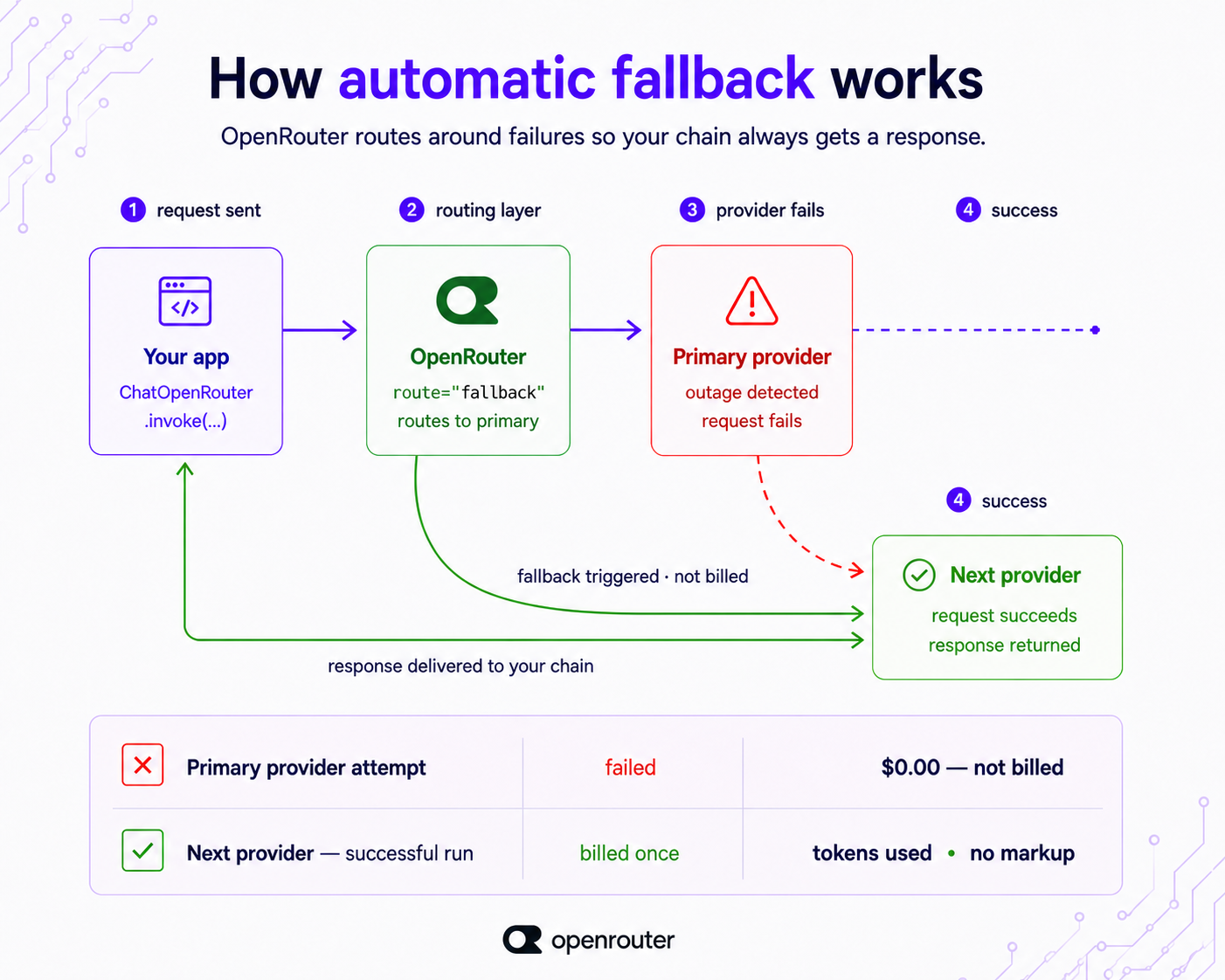
Your LangChain chain points at one ChatOpenRouter, we spread the request across providers, and you’re billed only for the run that succeeds.
Reasoning, multimodal, caching, and observability
Each of these is one constructor or request parameter.
Reasoning
Set a reasoning budget with the reasoning parameter:
model = ChatOpenRouter(
    model="anthropic/claude-sonnet-4.5",
    reasoning={"effort": "high", "summary": "auto"},
)
effort runs from xhigh down through high, medium, low, minimal, to none. Reasoning token counts appear in usage_metadata.output_token_details.reasoning, so you can see exactly what the thinking cost.
Multimodal inputs
Image, audio, video, and PDF inputs pass through HumanMessage content blocks, just as LangChain handles multimodal models. Which modalities are supported depends on the model; check the catalog for per-model capabilities.
Prompt caching
Drop a cache_control: {"type": "ephemeral"} breakpoint on a message content block to enable caching. Cache reads surface in usage_metadata.input_token_details.cache_read, so you can see the savings per call. The prompt caching guide covers the cost side.
Observability
Pass a session_id (up to 256 characters) to group related requests, and a trace object for per-request metadata. We forward both to your configured Broadcast destinations, so traces land in your existing stack without extra instrumentation.
None of these require changes to your chain structure; they’re constructor or request parameters that layer on top of whatever you’ve already built.
Common problems and how to fix them
Four problems come up often, and each has a fix.
Version compatibility on a beta package
langchain-openrouter is recent and in beta, so it requires a current LangChain. It’s not backward-compatible with older LangChain versions. Pin to the version on PyPI, upgrade LangChain alongside it, and don’t copy a version pin from an older tutorial.
The ChatOpenAI + base_url pattern
If you’re on an older LangChain version that predates the dedicated package, pointing ChatOpenAI’s base_url at https://openrouter.ai/api/v1 with your OpenRouter key still works. Use it when you can’t upgrade. With current LangChain, the dedicated ChatOpenRouter package provides cleaner access to provider routing, reasoning, and structured output, but there’s no urgency to migrate if your current setup is working.
The model returns the same answer every time
If a model keeps returning the same response, that’s almost always temperature or caching behavior, not a defect. Set a non-zero temperature and check whether prompt caching is active.
Per-model parameter support
Not every model supports every parameter you can pass. When in doubt, set require_parameters: true in openrouter_provider so we only route to providers that accept your parameters, or check the model page in the catalog first.
Standardize on the ChatOpenRouter package, pin it from PyPI or npm, and keep model strings current from openrouter.ai/models. Set openrouter_provider once and every call in your chain inherits cross-provider failover, billed only for the run that succeeds.
Frequently asked questions
Is OpenRouter the same as LangChain?
No. They compose rather than compete. OpenRouter is a model provider and router that sits behind one OpenAI-compatible API, giving you 400+ models from 70+ providers. LangChain is the orchestration framework you build chains and agents in. You use OpenRouter as a model inside LangChain through ChatOpenRouter.
How do I use OpenRouter with LangChain?
Install langchain-openrouter, set OPENROUTER_API_KEY, and instantiate ChatOpenRouter(model="provider/model"). Then call .invoke(...), .stream_events(...), .bind_tools(...), or .with_structured_output(...) like any LangChain chat model. The package is beta; pin the version from PyPI or npm. The TypeScript path uses @langchain/openrouter with the same shape.
Does LangChain support OpenRouter tool calling and structured output?
Yes. Use model.bind_tools([...]) for tools and model.with_structured_output(Schema, method="json_schema") for typed responses, both with strict=True to enforce the schema. These are first-class methods on the current ChatOpenRouter package and supersede the older JSON-schema workarounds on the legacy ChatOpenAI path.
Can I set provider routing or fallbacks from LangChain?
Yes. Pass openrouter_provider={...} to steer providers, and model_kwargs={"models": [...]} to fail over across models. Provider failover is on by default: OpenRouter price-load-balances and routes away from providers with an outage in the last 30 seconds. Failed requests aren’t billed; you pay only for the run that succeeds.
Do I still need the ChatOpenAI + base_url pattern?
Not on the current LangChain. The dedicated ChatOpenRouter package is the current path and gives cleaner access to provider routing, reasoning, and structured output. The ChatOpenAI override, pointing base_url at https://openrouter.ai/api/v1 with your OpenRouter key, still works as a fallback for older LangChain versions that predate the package.
Which models can I use?
Any of the 400+ models in the catalog, via the provider/model slug. Check openrouter.ai/models for current strings, per-model capabilities, and pricing. The available models and per-token rates change, so treat the catalog as the source of truth.